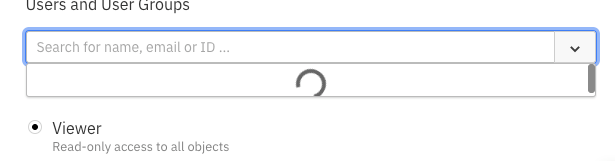
Typeahead loading panel is truncated

XMLWordPrintable

    • Type: Bug Report
    • Resolution: Fixed
    • Priority: L3 - Default
    • 3.0.0
    • Affects Version/s: 3.0.0
    • Component/s: frontend
    • None

      Reproduce: 

      • Create a Collection and go to users list
      • Click on add user to open the add user modal
      • open the Typeahead by focusing on the search input on slow connection

      Observed: 

      • The loading indicator has no spacing and looks truncated as shown in the attached image

      Expected: 

      • There is enough spacing in loading panel while the loading indicator is shown
            Assignee:
            Unassigned
            Reporter:
            Omran Abazeed
            Votes:
            0 Vote for this issue
            Watchers:
            0 Start watching this issue

              Created:
              Updated:
              Resolved: