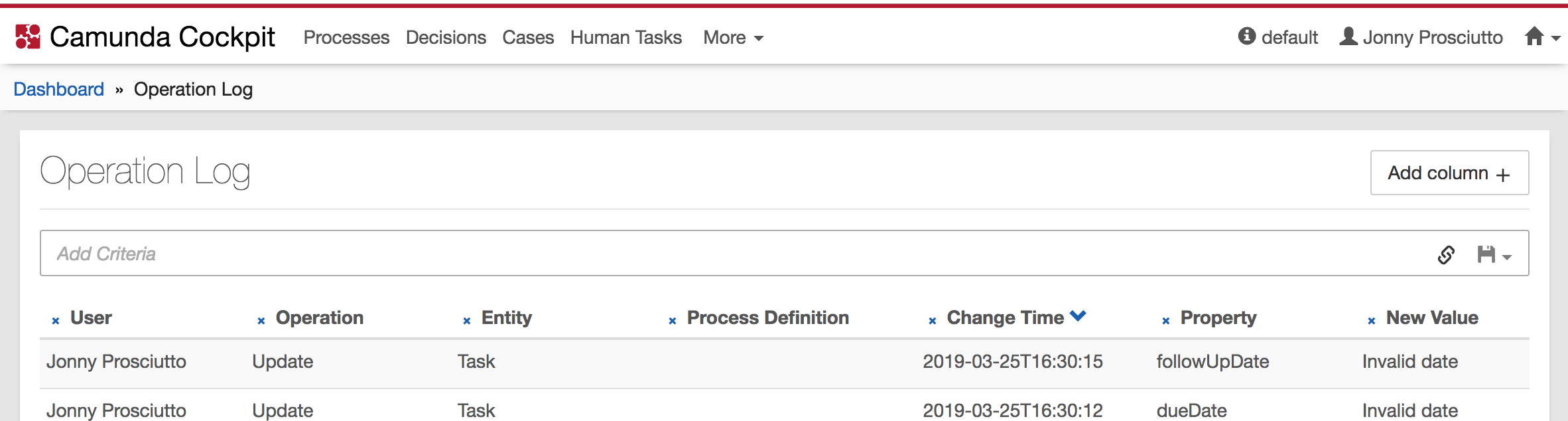
In Cockpit, on operation log page, "Add column" button is relocated

XMLWordPrintable

    • Type: Task
    • Resolution: Fixed
    • Priority: L3 - Default
    • 7.11.0, 7.11.0-alpha3
    • Affects Version/s: None
    • Component/s: None
    • None

      Steps to reproduce
      In Cockpit, go to operation log page

      AT

      • "Add column" button is positioned next to the headline "Operation Log" on the right side
      • See screenshot

            Assignee:
            Michael Schoettes
            Reporter:
            Tassilo Weidner-Mühl
            Votes:
            0 Vote for this issue
            Watchers:
            1 Start watching this issue

              Created:
              Updated:
              Resolved: