-
Type:
Bug Report
-
Resolution: Won't Fix
-
Priority:
 L3 - Default
-
None
-
Affects Version/s: 7.10.6
-
Component/s: bpmn model api
-
None
-
Environment:java-api
windows
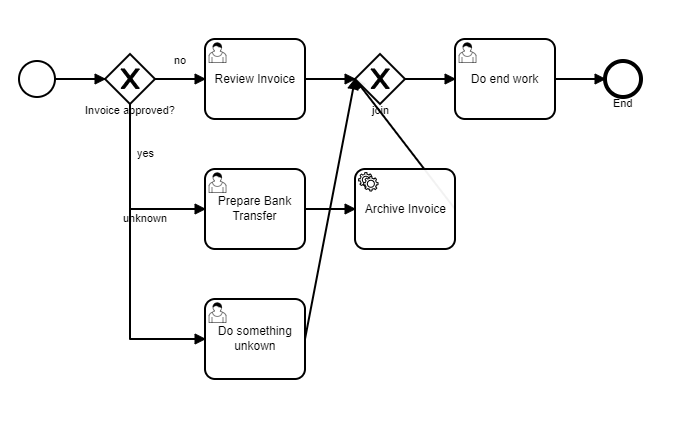
Creating a BPMN-Model via (Fluent) Java-Api there is an layout issue for the connect-method in the ServiceTaskBuilder class.
Unfortunately using the connect-method in the example below the created layout connects the tasks to the closing gateway with a direct line (also see attachment)
It would be nicer the connect method creates in these cases two rectangular di:waypoints, which ends on the lower diamond edge of the closing gateway node.
Is there any way to achieve this via the actual java-api?
Example-Code:
...
BpmnModelInstance modelInstance = Bpmn.createProcess()
                .name(pdtName)
                .startEvent()
                .exclusiveGateway("fork")
                .name("Invoice approved?")
                //--- Condition with one Tasks
                .condition("no", "${!approved}")
                .userTask()
                .name("Review Invoice")
                // - Add join Gateway
                .exclusiveGateway("join")
                .moveToNode("fork")
                //--- Condition with two Tasks
                .condition("yes", "${approved}")
                .userTask()
                .name("Prepare Bank Transfer")
                .camundaCandidateGroups("accounting")
                .serviceTask()
                .name("Archive Invoice")
                .camundaClass("org.camunda.bpm.example.invoice.service.ArchiveInvoiceService")
                .connectTo("join")
                .moveToNode("fork")
                //--- Condition with one Tasks
                .condition("unknown", "${!unknown}")
                .userTask()
                .name("Do something unkown")
                .connectTo("join")
                // --- End Task
                .moveToNode("join")
                .userTask()
                .name("Do end work")
                .endEvent()
                .name("End")
                .done();

        // Validate Modell
        Bpmn.validateModel(modelInstance);
...