Datepicker Controls look wrong when changing to text mode

XMLWordPrintable

    • Type: Bug Report
    • Resolution: Won't Fix
    • Priority: L3 - Default
    • None
    • Affects Version/s: 7.13.0-alpha2
    • Component/s: webapp
    • None

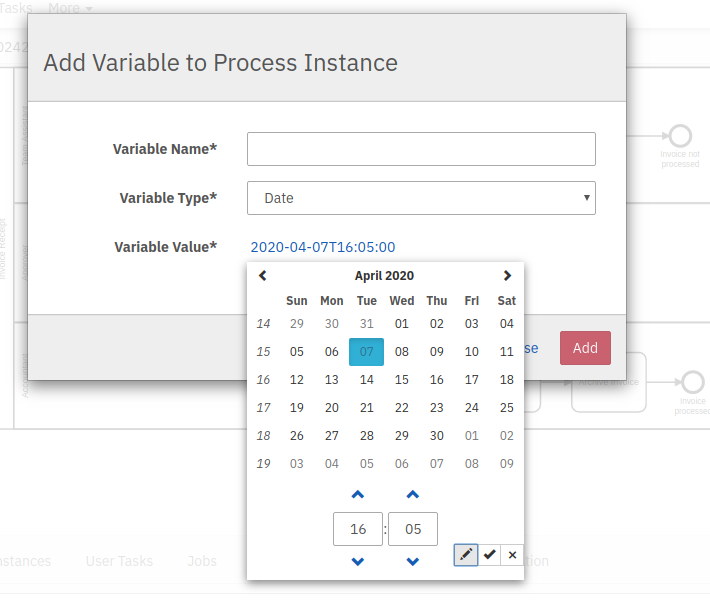
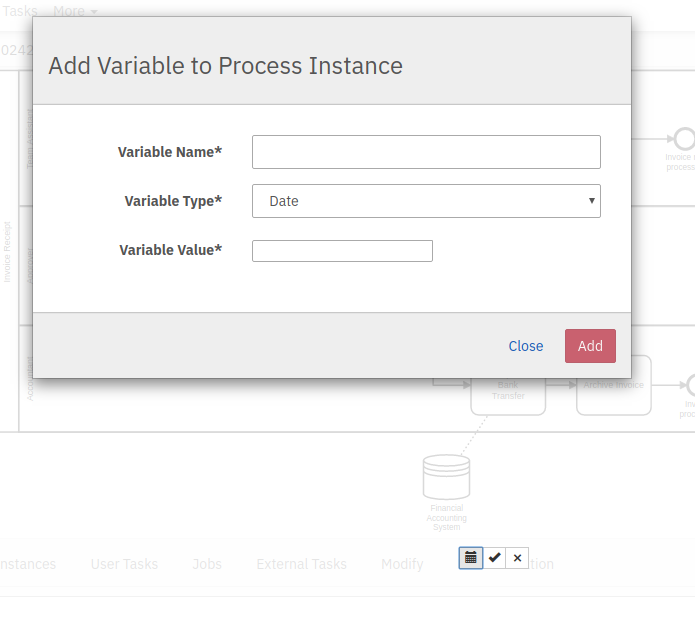
      When I open a date picker in the webapps and click on the pencil Icon, the Control buttons "float" somewhere on the page

      Expected
      They are either directly above the input field all the time or get moved there after changing the input mode
        This is the controller panel for Smart Panels app

              Assignee:
              Martin Stamm
              Reporter:
              Martin Stamm
              Votes:
              0 Vote for this issue
              Watchers:
              1 Start watching this issue

                Created:
                Updated:
                Resolved: