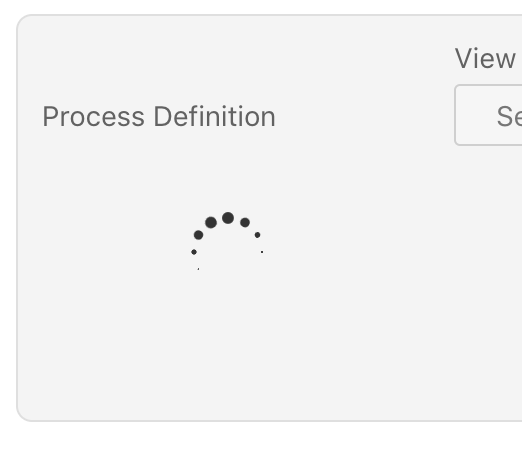
Process Definition Loading Indicator takes a lot of space

XMLWordPrintable

    • Type: Bug Report
    • Resolution: Fixed
    • Priority: L3 - Default
    • 2.7.0
    • Affects Version/s: None
    • Component/s: frontend
    • None

      What are the steps to reproduce your problem?
      1. Open Optimize with a slow network connection
      2. Create a new Report

      What is the problem?
      Notice that the process definition dropdown is not there but that a loading indicator shows up.
      The Report Builder panel gets expanded and the process definition label moves down.

      What would be the expected behavior:
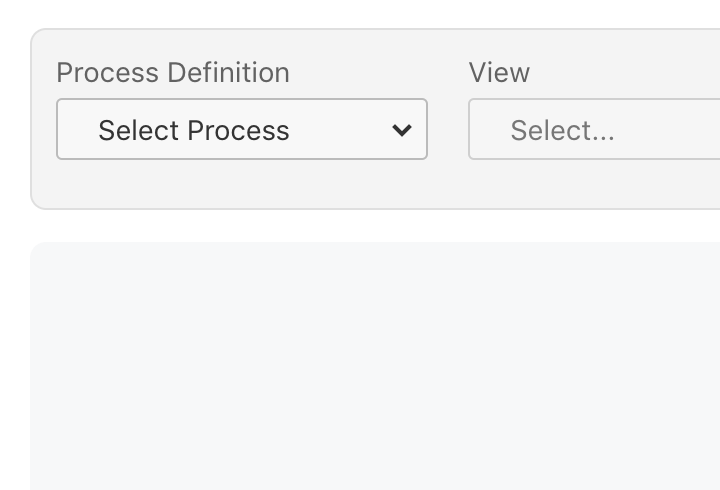
      Process Definition label stays in the same line.
      Height of the panel stays the same. Loading indicator just replaces the select I guess.

      Hints (optional):
      See attachments.
        This is the controller panel for Smart Panels app

              Assignee:
              Unassigned
              Reporter:
              Felix Mueller
              Votes:
              0 Vote for this issue
              Watchers:
              1 Start watching this issue

                Created:
                Updated:
                Resolved: